
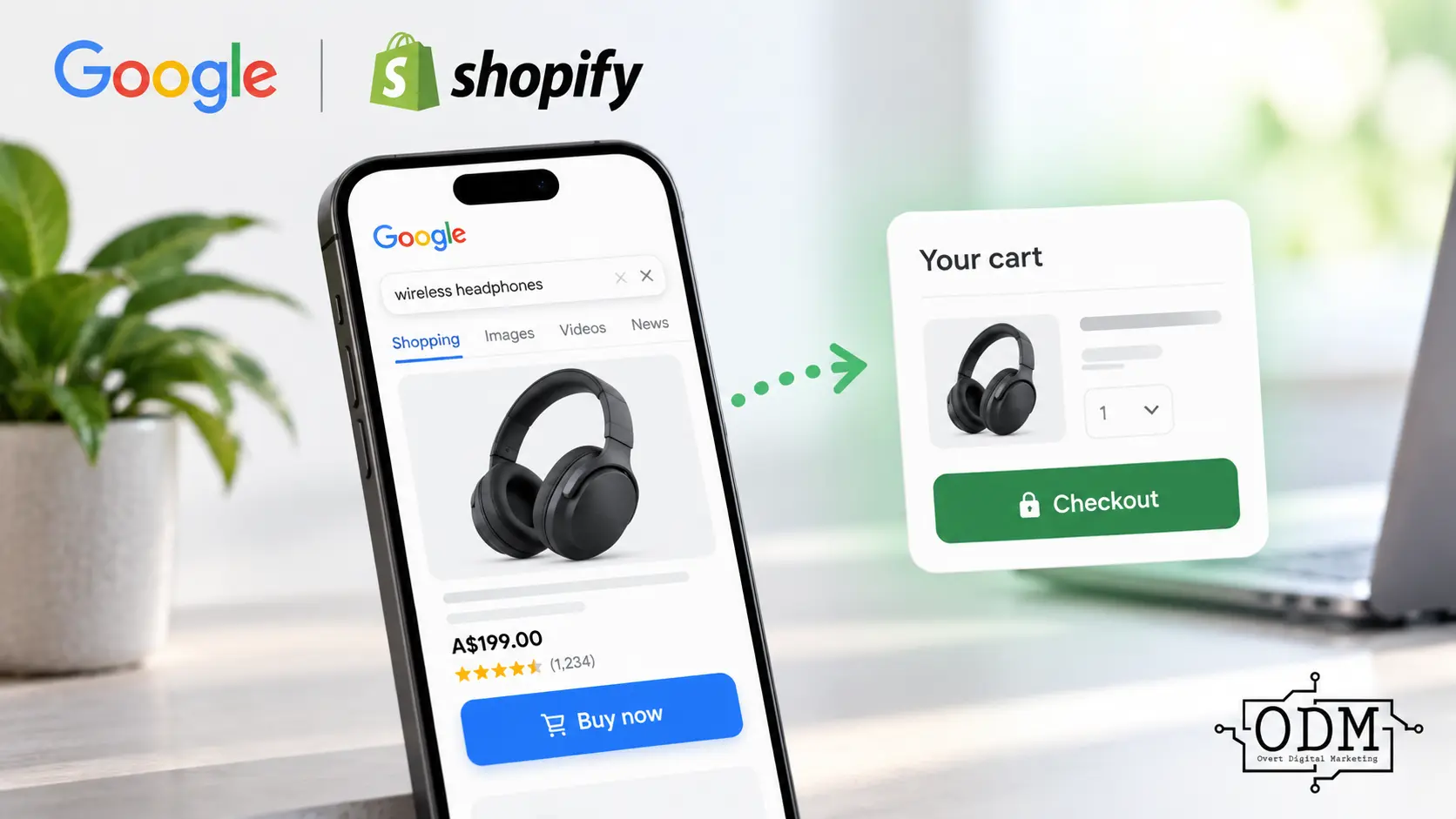
Google is making it easier for ready-to-buy customers to move directly from a Shopping ad to a retailer’s checkout, reducing the number of steps between discovering a product and completing a purchase.
With Google’s checkout feature, eligible Shopping ads can display an additional “Buy Now” option that takes customers directly to the merchant’s cart or checkout page. The existing link to the product detail page remains, giving customers the choice between learning more about the product or moving straight towards completing their purchase.
For ecommerce businesses, this might sound like a relatively small change, but it could have a significant impact on the customer journey. Every additional step between an advertisement and a completed transaction creates another opportunity for a potential customer to abandon the purchase. For someone who has already decided what they want, requiring them to visit another product page before proceeding to checkout may create unnecessary friction.
However, removing that step will not necessarily improve results for every product or every customer. Product pages often contain reviews, specifications, shipping information, imagery, guarantees and other information that helps customers make a purchasing decision.
The real opportunity is therefore not simply sending customers to checkout faster. It is understanding when the product page is helping the sale and when it is simply adding another step.
So, how does Google’s new direct checkout feature work, which advertisers can use it, and could sending customers directly from a Shopping ad to checkout actually improve ecommerce conversion rates?
What Is Google’s New Checkout Feature?
Google’s checkout feature gives ready-to-buy shoppers an additional way to purchase products directly from eligible Shopping listings and ads.
Traditionally, clicking a product listing takes the customer to the retailer’s product detail page. The customer can then review the product and, if they decide to purchase, add it to their cart and continue through the checkout process.
With the checkout feature enabled, Google can provide an additional link that takes the shopper directly to the merchant’s cart or checkout page. On eligible Shopping ads on YouTube, for example, this can appear as a “Buy Now” button.
Importantly, this does not replace the existing product page link. Customers who want more information can still visit the product detail page, while customers who are already ready to purchase have a shorter path to checkout.
Google creates the appropriate checkout URL using the product information and checkout details associated with the merchant’s account. The transaction itself still takes place on the retailer’s website rather than within Google.
The concept is straightforward: give customers who need more information access to the normal product page, while removing an unnecessary step for customers who have already made their purchasing decision.
How Does Direct Checkout From Google Shopping Ads Work?
The checkout feature creates an alternative purchase path for customers who are already ready to buy.
When an eligible product appears through Google, the shopper can still follow the standard link to the retailer’s product detail page. Where the checkout feature is available, Google can also provide a direct route to the merchant’s cart or checkout page.
Google uses the product information and URL associated with the merchant’s account to generate a checkout URL specific to the product. This means the customer can arrive at checkout with the relevant product already identified rather than having to navigate through the retailer’s website and add it manually.
Google also validates these checkout URLs to make sure they are working and take customers to a valid checkout experience. According to Google, this validation is recurring and can take up to 24 hours each time it is performed.
There are several requirements for the experience to work correctly. The retailer’s storefront must be publicly accessible, the checkout URL must function correctly, and the checkout page cannot require the customer to sign in before proceeding.
The purchase itself remains on the merchant’s website. Google is therefore not replacing the retailer’s ecommerce checkout. It is shortening the journey between the Shopping experience and the retailer’s existing cart or checkout.
For advertisers, that distinction is important. Google may be removing a step from the path to purchase, but the merchant’s own website, checkout experience and conversion tracking remain critical to whether that traffic ultimately turns into revenue.
Is Google Shopping Direct Checkout Available in Australia?
Yes, Google’s checkout feature supports products for sale in Australia, although availability varies depending on where the product listing or advertisement appears.
Google currently lists Australia among the countries supported by the checkout feature, alongside markets including Canada, France, Germany, Great Britain, India, Japan and the United States.
However, this does not mean every direct checkout placement or ad format available in the United States is also available in Australia. Google states that the checkout feature is available on some YouTube and Display advertising formats in the United States only.
This distinction is particularly important for Australian ecommerce businesses receiving notifications about the feature. Merchants should check which destinations are enabled within their own Google Merchant Center and Google & YouTube app settings rather than assuming every Shopping, YouTube or Display placement supports direct checkout.
For Australian Shopify merchants using the Google & YouTube app, the broader development is still significant. Google is creating a shorter path between product discovery and purchase, and Australia is one of the markets included within its checkout feature ecosystem.
As Google expands the feature, Australian ecommerce advertisers should monitor which placements become available and, more importantly, whether direct checkout produces better commercial results than sending customers through the traditional product page journey.
Why Google Is Removing Steps From the Shopping Journey
Every additional step in an ecommerce journey creates another opportunity for a customer to leave before completing their purchase.
A shopper might see the right product at the right price in a Google Shopping ad and already be ready to buy. Under the traditional journey, they still need to click through to the product page, potentially select the product again, add it to their cart and then proceed to checkout.
For some customers, those steps are necessary. For others, they simply add friction.
Google’s checkout feature attempts to distinguish between shoppers who still need to research a product and those who are ready to purchase. The standard product page remains available for customers who want more information, while the direct checkout option provides a shorter route for customers who have already made their decision.
From a conversion rate optimisation perspective, the principle makes sense. Reducing unnecessary clicks, page loads and decisions can make it easier for high-intent customers to complete a transaction, particularly on mobile devices where lengthy purchase journeys can create additional friction.
However, fewer steps do not automatically mean more sales.
The product page often performs an important conversion function. It can provide detailed imagery, specifications, reviews, delivery information, returns policies, guarantees and other reassurance that helps turn interest into a purchase.
The key question for ecommerce businesses is therefore whether the product page is helping the customer make their decision or simply standing between a ready-to-buy customer and the checkout.
That distinction will ultimately determine whether Google’s shorter purchase journey improves conversion performance for an individual retailer.
Could Direct Checkout Improve Ecommerce Conversion Rates?
Potentially, yes, but removing the product page from the purchase journey does not guarantee a higher conversion rate.
Google positions the checkout feature as a way to help merchants generate more sales by making it easier for ready-to-buy shoppers to complete their purchase. The logic is straightforward. If a customer has already decided to buy, reducing the number of clicks required to reach checkout could reduce abandonment and increase the likelihood of completing the transaction.
This could be particularly effective for products where the Shopping ad already provides much of the information needed to make a decision, such as the product image, price, brand and availability.
However, ecommerce conversion rates are influenced by much more than the number of steps in the purchase journey.
Price competitiveness, shipping costs, delivery times, payment options, brand recognition, returns policies, website trust and the checkout experience itself can all influence whether a customer completes their purchase.
There is also the question of what information the customer loses by bypassing the product page. If that page contains persuasive reviews, additional imagery, detailed specifications or information that helps justify the purchase, sending the customer directly to checkout could remove an important part of the conversion journey.
This is why the performance of direct checkout should be assessed using actual ecommerce results rather than assuming a shorter journey is automatically a better one.
For advertisers, the most important measures will ultimately be purchases, conversion rate, revenue, average order value, return on ad spend and profitability. If direct checkout improves those outcomes, it is reducing useful friction. If it does not, the product page may have been contributing more to the sale than the shorter customer journey suggests.
When Sending Customers Straight to Checkout Could Work Best
Direct checkout is likely to be most useful when the customer already has enough information to make a purchasing decision and the product page is adding little to that decision.
This could apply to relatively straightforward products where the brand, product, price and key details are already clear from the Shopping listing. A customer searching for a specific pair of shoes, replacement product, household item or other familiar purchase may not need to read a detailed product page before buying.
Brand familiarity can also make a difference. Someone who already knows the retailer or has purchased from them previously may require less reassurance before proceeding to checkout. In these situations, removing an additional page from the journey could make completing the purchase faster and easier.
Direct checkout may also work well where purchase intent is particularly strong. A customer searching for a specific product model, size or variation is potentially much further through the decision-making process than someone conducting broad category research.
Price competitiveness is another consideration. If the Shopping ad clearly shows the product and an attractive price, the customer may already have enough information to proceed. Sending them directly to checkout could help capitalise on that intent before they continue comparing other retailers.
The common factor is not necessarily the type of product being sold. It is how much additional information the customer needs before feeling confident enough to purchase.
For ecommerce advertisers, this means direct checkout may perform very differently across products within the same account. Rather than assuming the feature should be treated uniformly across an entire product catalogue, performance should be evaluated according to customer intent, product complexity and the role the product page plays in converting each type of shopper.
When Bypassing the Product Page Could Hurt Conversions
While direct checkout can reduce friction for customers who are ready to buy, the product page remains an important part of the purchasing journey for many ecommerce businesses.
Higher-consideration products often require more information before a customer is comfortable making a purchase. Specifications, sizing information, product comparisons, additional photography, videos, customer reviews, warranties, delivery details and returns policies can all help answer questions and overcome objections.
If a customer moves directly from a Shopping ad to checkout without seeing this information, the shorter journey could actually create more uncertainty rather than less friction.
This can be particularly important for products with multiple variants or options. Customers may want to confirm the correct size, colour, model, compatibility or configuration before committing to the purchase. If the checkout experience does not provide enough information to verify those selections, customers may abandon the transaction or purchase the wrong product.
Trust is another consideration. A customer encountering an unfamiliar retailer through Google Shopping may want to learn more about the business before providing payment information. A well-designed product page can provide reviews, guarantees, delivery information and other trust signals that reassure the customer they are purchasing from a credible retailer.
There can also be opportunities for additional revenue on the product page. Related products, bundles, accessories and quantity incentives can increase average order value before the customer reaches checkout. Bypassing that page may remove some of those opportunities.
This is why reducing the number of steps should not be the objective by itself. The objective is to remove unnecessary friction while retaining the information and reassurance customers need to complete the purchase.
For some products, the fastest route to checkout may produce the best result. For others, the product page is not an obstacle to conversion. It is part of what creates the conversion.
Your Checkout Page Now Has to Do More Work
If customers can move directly from a Google Shopping ad to checkout, the checkout page becomes more than simply the final step in processing an order.
It may also be the first substantial interaction that customer has with the retailer’s website.
That changes what the checkout experience needs to achieve. A customer arriving from a product page has already had an opportunity to review the product, understand the retailer and confirm important information. Someone arriving directly from Google may need some of that reassurance at the checkout itself.
Google recommends that checkout pages clearly communicate the retailer’s brand, product information, quantity, price and relevant product variants. Customers should be able to easily confirm that they have reached the correct website and that the product in their cart is exactly what they intended to purchase.
Pricing also needs to be transparent. Unexpected shipping charges or other costs appearing late in the checkout process can create hesitation and abandonment, particularly when the customer has bypassed the product page.
Shipping information, returns conditions and relevant product disclosures become increasingly important for the same reason. Google recommends merchants provide applicable product warnings and required disclosures at checkout rather than relying solely on information displayed on the product page.
The product feed also plays an important role. Accurate availability, shipping costs, delivery information, returns information and product variants help establish the expectations a customer has before reaching the retailer’s website.
From a conversion rate optimisation perspective, businesses using direct checkout should therefore review the entire checkout experience rather than simply enabling the new Google feature.
A shorter path to purchase only works if the destination gives customers enough information and confidence to complete the transaction. Removing the product page may eliminate one source of friction, but a confusing or incomplete checkout experience can quickly replace it with another.
What Happens to Product Page Traffic?
Google’s checkout feature does not remove the existing link to the retailer’s product detail page.
The standard product page remains available for shoppers who want to learn more before purchasing. The checkout feature adds another pathway for customers who are already ready to buy and would prefer to move directly to the cart or checkout.
This means ecommerce businesses are not being forced to choose between product page traffic and direct checkout traffic. Google can support both customer journeys depending on how the shopper chooses to interact with the listing or ad.
That distinction is important because customers can be at very different stages of the purchasing journey even when viewing the same product.
One shopper may still want to examine additional images, read reviews, check specifications or understand delivery and returns before purchasing. Another may already know exactly what they want and simply be looking for the right retailer and price.
Maintaining both pathways allows the product page to continue performing its research and persuasion role while giving higher-intent customers an opportunity to skip directly to purchase.
For ecommerce businesses, this also creates an interesting optimisation question. If direct checkout becomes a meaningful source of transactions, advertisers should look beyond overall website conversion rates and understand how customers using the different pathways behave.
Do customers sent directly to checkout convert at a higher rate? Do they have a different average order value? Are they more likely to abandon checkout? Does product page traffic generate more cross-sells or larger orders?
Those are the types of questions that will determine whether Google’s checkout feature is genuinely improving ecommerce performance rather than simply changing where customers enter the website.
What Shopify Merchants Need to Know
For Shopify businesses using the Google & YouTube app, the checkout feature can be managed through the existing integration between Shopify and Google Merchant Center.
When the feature is enabled for an eligible destination, Google uses the product information and URL associated with the Shopify store to create a checkout link for each applicable product. This allows customers using the direct checkout option to move from the Google listing or ad into the retailer’s existing cart or checkout experience.
Merchants can review their checkout settings within the Google & YouTube app by going to Settings, locating Product feed settings and selecting Manage beside Checkout link settings.
Businesses that do not want to use the feature can select Don’t include a link to checkout and save the change.
More granular destination controls are available through Google Merchant Center. Under the checkout settings, merchants can review where the checkout feature is permitted to appear, including its use within eligible advertising destinations.
Shopify merchants should also make sure their storefront is publicly accessible and does not require a password. The checkout page itself cannot require customers to sign in before proceeding, as Google needs to be able to validate that the checkout URL provides a functioning purchase experience.
Before leaving the feature enabled, businesses should also confirm that product variants, prices, availability, shipping information and checkout tracking are working correctly. A direct route to checkout provides little benefit if customers arrive with the wrong product configuration or if purchases cannot be measured accurately.
For Shopify retailers already running Google Shopping campaigns, this should therefore be treated as more than another setting within the Google & YouTube app. It changes part of the customer journey and should be reviewed alongside product feed quality, conversion tracking and the overall checkout experience.
Google Is Automatically Opting Some Merchants In
One of the more important details for Shopify merchants is that Google’s checkout feature may be enabled automatically rather than requiring businesses to actively switch it on.
Merchants receiving Google’s rollout notice should therefore review their settings rather than assume nothing will change unless they take action. Google has advised affected merchants that they can opt out if they do not want checkout links included with their eligible listings or ads.
For merchants using the Google & YouTube app on Shopify, the checkout setting can be managed under Settings > Product feed settings > Checkout link settings. Merchants can select Don’t include a link to checkout if they do not want the feature enabled.
Google Merchant Center also provides controls over the destinations where checkout links can appear, allowing merchants to review whether the feature is used for eligible advertising or listing experiences.
The important point is that automatic enrolment should not be treated as an indication that direct checkout will necessarily improve performance for every ecommerce store.
Before allowing the feature to run, merchants should understand how their customers currently use product pages, whether their checkout provides enough information for customers arriving directly from Google and whether conversion tracking can accurately measure the resulting transactions.
For some retailers, leaving direct checkout enabled may provide a useful opportunity to reduce purchase friction. For others, particularly where product pages play an important role in explaining or selling the product, it may be worth testing the impact carefully.
The decision should ultimately be based on customer behaviour and commercial performance, not simply Google’s default setting.
How Does Google Validate Checkout URLs?
Because Google’s checkout feature can send customers directly into a retailer’s purchase process, Google needs to verify that the destination actually works as expected.
Google validates checkout URLs to confirm that they lead to a valid and functioning cart or checkout page. This is not simply a one-off check when the feature is first enabled. Google states that checkout URLs are reviewed on a recurring basis, with the validation process potentially taking up to 24 hours each time.
One important requirement is that customers cannot be forced to sign in before accessing the checkout experience. The retailer’s storefront must also be publicly accessible rather than protected by a password.
For merchants, this means changes to the website or checkout process need to be considered carefully. Changes to product URLs, Shopify configuration, redirects, checkout functionality or other parts of the ecommerce setup could potentially affect whether Google’s checkout link continues to function correctly.
The checkout destination also needs to provide customers with enough information to confidently complete their purchase. Google recommends clearly displaying the retailer’s brand, product details, quantity, selected variants and pricing, along with applicable product disclosures.
Accurate product feed information is equally important. Shipping costs and dates, returns information, minimum order requirements, free shipping thresholds and product availability can all help ensure that what the customer sees through Google aligns with what they encounter when they reach checkout.
For ecommerce businesses, this reinforces the importance of treating Merchant Center, the product feed and the website as one connected system. A Shopping campaign can generate strong purchase intent, but inaccurate product data or a poor checkout destination can still prevent that intent from turning into revenue.
What Should Ecommerce Advertisers Check Before Using Direct Checkout?
Before enabling direct checkout, ecommerce businesses should make sure the entire path from the Google Shopping ad through to the completed transaction is working correctly.
The first priority is product feed accuracy. Prices, availability, product variants, shipping costs and other information shown through Google need to match what the customer encounters when they reach checkout. A customer clicking “Buy Now” only to discover a different price, unavailable variation or unexpected delivery cost is more likely to abandon the purchase.
The checkout experience itself should also be reviewed from the perspective of someone who has never visited the product page. Is it immediately clear which product they are purchasing? Can they confirm the size, colour or variation? Is the retailer clearly identifiable? Are shipping costs, delivery expectations, returns information and the total purchase price easy to understand?
Mobile usability is particularly important. Shopping ads can reach customers across mobile environments, so the checkout should be fast, easy to navigate and straightforward to complete on a smaller screen.
Conversion tracking also needs to be checked before evaluating performance. Google Ads purchase conversions, transaction values and GA4 ecommerce tracking should accurately record sales generated through the checkout journey. Where appropriate, advertisers should also review their enhanced conversions implementation and ensure transaction data is being captured without duplication.
Advertisers should then establish a performance baseline. Knowing the existing conversion rate, average order value, checkout abandonment rate, revenue and return on ad spend provides something meaningful against which direct checkout performance can be assessed.
This is especially important because a higher checkout conversion rate does not necessarily mean the overall result is better. If customers bypassing the product page purchase fewer additional products or generate a lower average order value, the commercial impact may be different from what the conversion rate alone suggests.
Direct checkout should therefore be treated as a measurable change to the ecommerce customer journey. Before deciding whether it is beneficial, advertisers need reliable tracking and a clear understanding of what successful performance actually means for the business.
How Should You Measure Whether Direct Checkout Is Working?
The success of Google’s checkout feature should not be judged simply by whether more customers reach the checkout page.
The objective is to determine whether the shorter purchase journey generates more profitable sales.
Conversion rate is an obvious starting point. If customers who bypass the product page are more likely to complete a purchase, that provides evidence that the additional page was creating unnecessary friction. However, conversion rate should never be assessed in isolation.
Revenue and return on ad spend are equally important. A higher conversion rate provides limited value if customers using direct checkout generate smaller orders or if the additional sales are concentrated on low-margin products.
Average order value should therefore also be monitored. Product pages often contain related products, bundles, accessories and other opportunities to increase the value of an order. If customers bypass those pages, retailers need to understand whether the shorter journey affects cross-selling and overall basket size.
Checkout abandonment is another useful measure. If large numbers of customers use the direct checkout option but leave without purchasing, it could indicate that important information or reassurance normally provided by the product page is missing from the checkout experience.
Advertisers should also look at product-level performance rather than relying only on account-wide averages. Direct checkout may work extremely well for familiar, straightforward products while performing poorly for products that require more research or explanation.
Most importantly, measurement needs to extend beyond the metrics reported inside Google Ads. Google Ads, GA4 and the ecommerce platform should provide a consistent view of transactions and revenue, while the business should consider margins, customer value and profitability when determining whether the feature is actually delivering a better result.
The question is not whether direct checkout generates more clicks or even more conversions. The question is whether removing a step from the customer journey generates more commercially valuable revenue from the advertising investment.
What Does This Tell Us About the Direction of Google Shopping?
Google’s checkout feature is part of a broader shift in ecommerce advertising from simply generating website traffic towards helping customers complete more of the purchasing journey directly from the advertising experience.
Historically, the primary role of a Shopping ad was to connect someone searching for a product with the retailer’s website. The advertisement generated the visit, while the website was responsible for turning that traffic into a sale.
Direct checkout begins to shorten that separation.
Customers can already see important purchasing information within Google, including product imagery, pricing, availability, retailer information and other product details. Adding a direct route to checkout means a customer who has enough information to make a decision may no longer need to follow the traditional product page journey before purchasing.
For ecommerce advertisers, this reinforces the growing importance of product data. The information supplied through Google Merchant Center is no longer simply supporting an advertisement that sends someone to a website. It increasingly forms part of the shopping experience itself.
That makes accurate titles, descriptions, images, pricing, availability, shipping information, returns data and product attributes increasingly important to advertising performance.
It also changes how ecommerce businesses should think about their websites. Product pages will remain important, particularly for customers who need more information before purchasing, but the website may no longer be the starting point for every customer interaction with the product.
Google Shopping is increasingly becoming part of the shopping journey rather than simply a source of traffic into it.
For advertisers, the implication is clear. Managing ecommerce advertising effectively requires more than optimising campaigns and bids inside Google Ads. Product feeds, Merchant Center, conversion tracking, website experience and checkout performance all need to work together if advertising investment is going to translate into profitable ecommerce growth.
How Overt Digital Marketing Approaches Ecommerce Advertising
At Overt Digital Marketing, we do not look at Google Shopping performance as simply a Google Ads management exercise.
For an ecommerce campaign to perform effectively, the advertising account, Google Merchant Center, product feed, website, checkout experience and conversion tracking all need to work together.
Google’s direct checkout feature reinforces this point. An advertiser could have strong campaign targeting and competitive products, but if customers arrive at a confusing checkout, encounter unexpected shipping costs or cannot easily confirm what they are purchasing, valuable advertising traffic can still be lost.
The same applies to measurement. Generating more reported conversions is not necessarily an improvement if average order value falls, margins are poor or the additional sales do not generate a sustainable return on advertising spend.
Our approach is therefore to evaluate ecommerce advertising against the commercial outcome. That includes looking at how campaigns generate traffic, how customers behave once they interact with the website or checkout, where conversion friction exists and whether advertising investment is translating into profitable revenue.
Features such as direct checkout can provide valuable opportunities, but they should be tested and measured rather than adopted simply because Google makes them available.
For some ecommerce businesses, removing the product page from part of the customer journey could help ready-to-buy customers convert faster. For others, that page may be doing important work in building confidence and increasing order value.
The objective is not to create the shortest possible customer journey. It is to create the most effective path from advertising investment to profitable ecommerce sales.
Frequently Asked Questions
What is Google Shopping’s checkout feature?
Google’s checkout feature gives ready-to-buy customers a faster route from eligible product listings or ads to a retailer’s cart or checkout page. It provides an additional purchase pathway while retaining the normal link to the product detail page.
Can Google Shopping Ads send customers directly to checkout?
Yes. Where the checkout feature and advertising format are eligible, Google can provide a direct link that takes a customer to the merchant’s cart or checkout rather than requiring them to visit the product page first.
Is Google Shopping direct checkout available in Australia?
Australia is one of the countries supported by Google’s checkout feature. However, availability varies by destination and advertising format. Google currently states that some YouTube and Display advertising formats using the checkout feature are available in the United States only.
Does the Buy Now button replace my product page?
No. The existing product detail page link remains available. Direct checkout provides an additional option for customers who are ready to purchase, while shoppers who need more information can continue through to the product page.
Do Shopify stores automatically get Google’s checkout feature?
Eligible Shopify merchants using the Google & YouTube app may be automatically opted into the checkout feature for applicable destinations. Merchants should review their individual checkout settings rather than assuming the feature is either enabled or disabled.
Can I turn off direct checkout from Google Shopping?
Yes. Shopify merchants can manage the feature through the Google & YouTube app under their checkout link settings. Google Merchant Center also provides controls for managing the destinations where eligible checkout links can appear.
Will direct checkout improve Google Shopping conversion rates?
It could, particularly for customers who already know what they want and do not need to visit the product page before purchasing. However, results will depend on the product, customer intent, checkout experience, pricing, shipping, trust and the role the product page normally plays in the purchasing decision. Advertisers should measure the impact using actual sales, revenue, average order value, return on ad spend and profitability rather than assuming fewer steps will automatically produce better results.